Note
This page was generated from docs/notebooks/inversion/tomography_experiment.ipynb.
Tomographic Reconstruction (experimental data)#
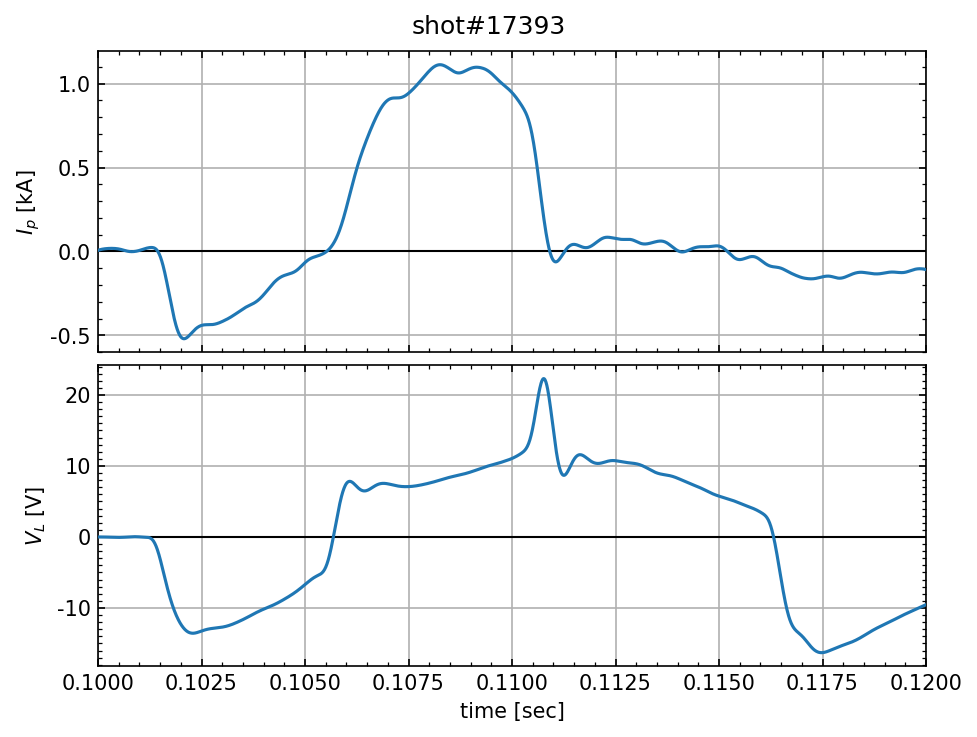
Here, we calculate reconstructed images from captured data by the fast camera with the L-curve criterion.
[1]:
from pathlib import Path
import numpy as np
from matplotlib import pyplot as plt
from matplotlib.ticker import MultipleLocator
from numpy.lib.format import open_memmap
from numpy.typing import NDArray
from raysect.optical import World
from cherab.phix.inversion import Lcurve
from cherab.phix.tools.raytransfer import import_phix_rtc
from cherab.phix.tools.utils import profile_1D_to_2D
from cherab.phix.tools.visualize import show_phix_profile
plt.rcParams["figure.dpi"] = 150
# Path diffinition
EXP_DATA = Path().cwd().parent.parent.parent / "output" / "experiment_data" / "shot_17393"
SVD_DIR = (
Path().cwd().parent.parent.parent / "output" / "RTM" / "2022_12_13_00_49_29" / "w_laplacian"
)
# Create scene objects
world = World()
rtc = import_phix_rtc(world)
Example experimental Data#
Show the waveform of shot #17393 and camera images
[2]:
# Load Data
_Ip_time = np.loadtxt(EXP_DATA / "Ip_fill.csv", delimiter=",")
time = _Ip_time[:, 0]
plasma_current = _Ip_time[:, 1] * 1.0e-3
loop_vltage = np.loadtxt(EXP_DATA / "VL_fill.csv", delimiter=",")[:, 1]
[3]:
fig, axes = plt.subplots(2, 1, constrained_layout=True)
i = 0
for ax, data, label in zip(axes, [plasma_current, loop_vltage], ["$I_p$ [kA]", "$V_L$ [V]"]):
ax.plot(time, data, zorder=3)
ax.set_ylabel(label)
ax.set_xlim(0.1, 0.12)
ax.xaxis.set_minor_locator(MultipleLocator(0.0005))
ax.xaxis.set_major_locator(MultipleLocator(0.0025))
ax.xaxis.set_major_formatter("{x:.4f}")
ax.tick_params(direction="in", labelsize=10, which="both", top=True, right=True)
ax.grid(zorder=0)
ax.plot([time[0], time[-1]], [0, 0], color="k", linewidth=1, zorder=2)
if i < 1:
ax.set_xticklabels([])
i += 1
axes[0].yaxis.set_minor_locator(MultipleLocator(0.1))
axes[1].yaxis.set_minor_locator(MultipleLocator(1.0))
axes[0].yaxis.set_major_formatter("{x:.1f}")
axes[1].yaxis.set_major_formatter("{x:.0f}")
axes[-1].set_xlabel("time [sec]")
fig.suptitle("shot#17393");
Tomographic Reconstruction with L-curve criterion#
Let us reconstruct the one frame (1069 frame) of Video image.
[4]:
frame = 1069
camera_frame = open_memmap(EXP_DATA / "Halpha" / f"{frame}.npy")
Load SVD components using numpy.memmap array.
[5]:
s = open_memmap(SVD_DIR / "s.npy")
u = open_memmap(SVD_DIR / "u.npy")
basis = open_memmap(SVD_DIR / "L_inv_V.npy")
Instantiate Lcurve class
Execute L-curve optimization
[7]:
bounds = (-26.0, -15.0)
sol, status = lcurve.solve(bounds=bounds, disp=False)
print(status)
message: ['requested number of basinhopping iterations completed successfully']
success: True
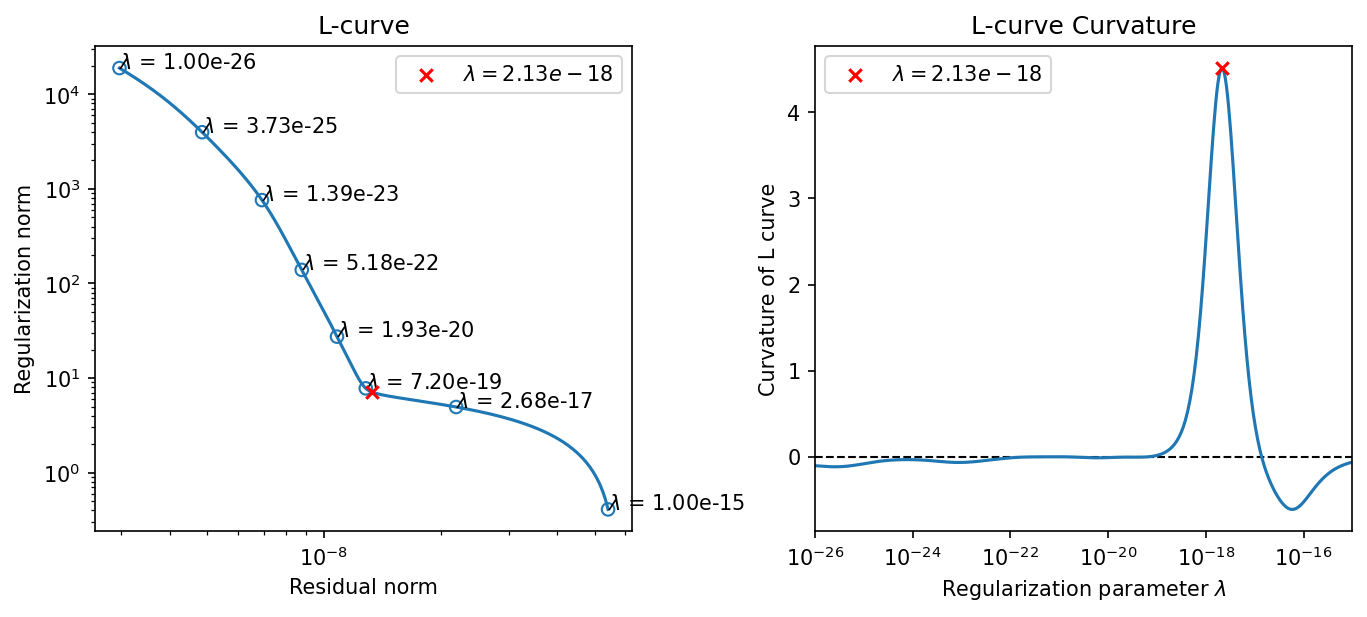
fun: -4.510338539796244
x: [-1.767e+01]
nit: 100
minimization_failures: 0
nfev: 1038
njev: 519
lowest_optimization_result: message: CONVERGENCE: NORM_OF_PROJECTED_GRADIENT_<=_PGTOL
success: True
status: 0
fun: -4.510338539796244
x: [-1.767e+01]
nit: 4
jac: [ 1.332e-06]
nfev: 18
njev: 9
hess_inv: <1x1 LbfgsInvHessProduct with dtype=float64>
Plot L-curve and its curvature. The red cross point corresponds to the optimal regularization parameter.
[8]:
fig, axes = plt.subplots(1, 2, constrained_layout=True, figsize=(9, 4))
# L-curve plot
lcurve.plot_L_curve(fig=fig, axes=axes[0], scatter_plot=8, bounds=bounds, n_beta=500)
axes[0].set_title("L-curve")
axes[0].legend()
# curvature plot
lcurve.plot_curvature(fig=fig, axes=axes[1], bounds=bounds, n_beta=500)
axes[1].set_title("L-curve Curvature")
axes[1].legend()
[8]:
<matplotlib.legend.Legend at 0x7fa701f69730>
Show the reconstructed image and camera image. (Note that the camera image is flipped left to right.)
[9]:
fig, axes = plt.subplots(1, 2, constrained_layout=True)
axes[0].imshow(np.fliplr(camera_frame.T), cmap="inferno", extent=(0, 255, 511, 0))
# axes[0].plot(limiter[:, 0] - 1, limiter[:, 1] - 1, color="w", linewidth=0.5)
axes[0].set_title("camera image")
axes[0].set_xlabel("x [px]")
axes[0].set_ylabel("y [px]")
contours = show_phix_profile(
axes[1], profile_1D_to_2D(sol, rtc=rtc), rtc=rtc, vmin=0
)
axes[1].set_title("Reconstruction image")
axes[1].set_xlabel("$R$[m]")
axes[1].set_ylabel("$Z$[m]")
fig.suptitle(f"frame: {frame}");

Project the reconstructed-image contours onto camera image#
Using the calcam functionality enables us to show the reconstructed-image contours on the camera image.
[10]:
from calcam import CADModel, Calibration
from cherab.phix import __path__
CALIB_PATH = (
Path(__path__[0]) / "observer" / "fast_camera" / "calibration_data" / "shot_17393_ideal.ccc"
)
CAD_PATH = Path(__path__[0]) / "machine" / "geometry" / "data" / "PHiX_calcam_CAD.ccm"
# Load the calibration
cam_calib = Calibration(CALIB_PATH)
# Load the CAD model
phix_cad = CADModel(CAD_PATH)
Extracting CAD model...
To show the camera image flipped left to right, we have to transform the the contours points as well. The following local functions are defined to manage it and show contours to the specific axes.
[11]:
from scipy.interpolate import interp1d
def fliplr(points_2D: np.ndarray) -> np.ndarray:
"""To flip the 2D points from left to right in image"""
new_points = np.zeros_like(points_2D)
center = np.array([125, 256])
for i in range(len(points_2D[:, 0])):
new_points[i, :] = (
2 * np.array([center[0], 0]) + np.array([[-1, 0], [0, 1]]) @ points_2D[i, :]
)
return new_points
def project_lines(lines: list[NDArray], phi: float) -> list[NDArray]:
"""Project lines onto a image at a certain toroidal angle."""
projected_lines = []
for line in lines:
line_xyz = np.vstack([line[:, 0] * np.cos(phi), line[:, 0] * np.sin(phi), line[:, 1]]).T
projected_lines += [cam_calib.project_points(line_xyz, check_occlusion_with=phix_cad)[0]]
return projected_lines
def project_limiter_points(phi: float) -> NDArray:
"""Project interpolated limiter edge points onto a image at a certain toroidal angle."""
# resample inner limiter nodes
INNER_LIMITER = np.array(
[
[0.2400, 0.1650],
[0.2400, -0.1650],
[0.3550, -0.165],
[0.42, -0.06],
[0.42, 0.06],
[0.3550, 0.165],
[0.2400, 0.1650],
]
)
r_interpolated = interp1d(np.linspace(0, 1, len(INNER_LIMITER[:, 0])), INNER_LIMITER[:, 0])
z_interpolated = interp1d(np.linspace(0, 1, len(INNER_LIMITER[:, 1])), INNER_LIMITER[:, 1])
# re-sampling Limiter edge
limiter = np.array([[r_interpolated(i), z_interpolated(i)] for i in np.linspace(0, 1, 500)])
limiter_xyz = np.vstack(
[limiter[:, 0] * np.cos(phi), limiter[:, 0] * np.sin(phi), limiter[:, 1]]
).T
limiter_projected = cam_calib.project_points(limiter_xyz, check_occlusion_with=phix_cad)[0]
return limiter_projected
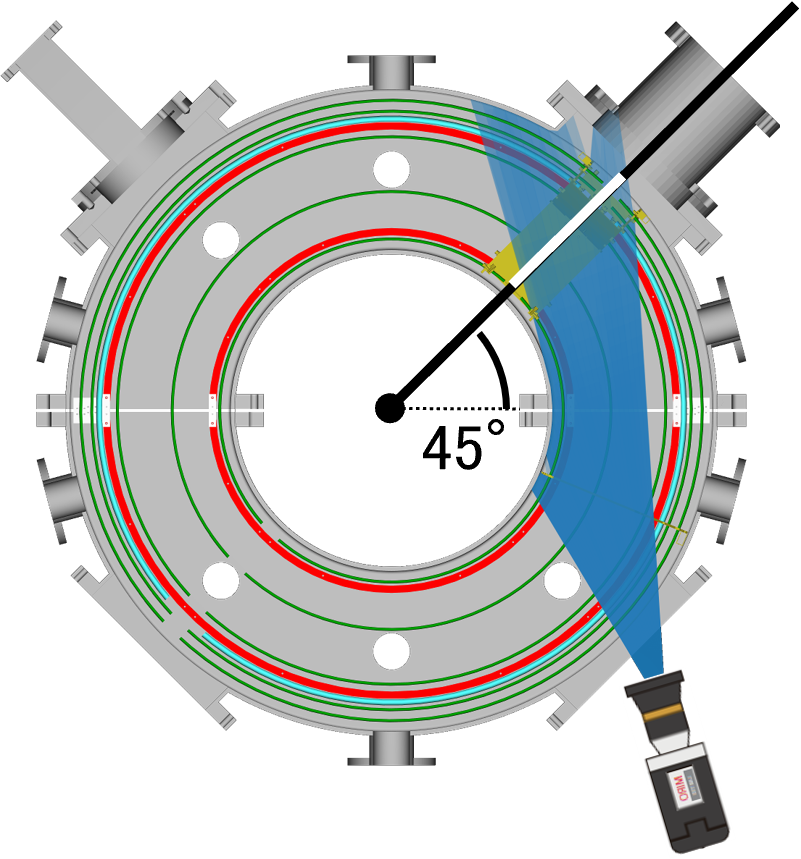
The reconstructed-image contours are projected at a certain toroidal cross section corresponding to the center of the limiter. The following schematic diagram shows them from the top view:
Camera’s field of View and projected place represented as white line.#
Show the projected image contours
[12]:
# toroidal angle where the contours are projected.
phi = (180 + 45) * np.pi / 180
fig, axes = plt.subplots(1, 2, constrained_layout=True)
# Show recontructed image
contours = show_phix_profile(
axes[1], profile_1D_to_2D(sol, rtc=rtc), rtc=rtc, vmin=0
)
axes[1].set_title("Reconstruction image")
axes[1].set_xlabel("$R$[m]")
axes[1].set_ylabel("$Z$[m]")
# Show camera image with projected contours
axes[0].imshow(np.fliplr(camera_frame.T), cmap="inferno", extent=(0, 255, 511, 0))
contours = project_lines(contours, phi)
for cont in contours:
cont = fliplr(cont)
axes[0].plot(cont[:, 0], cont[:, 1], color="w", linewidth=0.5)
# plot projected limiter
limiter_pts = fliplr(project_limiter_points(phi))
axes[0].plot(limiter_pts[:, 0], limiter_pts[:, 1], color="w", linewidth=1.0)
axes[0].set_title("camera image")
axes[0].set_xlabel("x [px]")
axes[0].set_ylabel("y [px]")
axes[0].set_xlim(0, 255)
fig.suptitle(f"frame: {frame}");
Loading mesh file: FBC_half_down.STL...
Loading mesh file: FBC_half_down2.STL...
Loading mesh file: FBC_half_up.STL...
Loading mesh file: FBC_half_up2.STL...
Loading mesh file: FL_half.STL...
Loading mesh file: FL_half2.STL...
Loading mesh file: limiter_225.STL...
Loading mesh file: limiter_box.STL...
Loading mesh file: MG_port.STL...
Loading mesh file: vaccum_flange.STL...
Loading mesh file: rail_connection_half.STL...
Loading mesh file: rail_connection_half2.STL...
Loading mesh file: rail_half_down.STL...
Loading mesh file: rail_half_down2.STL...
Loading mesh file: rail_half_up.STL...
Loading mesh file: rail_half_up2.STL...
Loading mesh file: vessel_gasket_half.STL...
Loading mesh file: vessel_gasket_half2.STL...
Loading mesh file: vessel_wall_fine.STL...
Loading mesh file: vessel_wall_fine2.STL...

Reconstruct all frames#
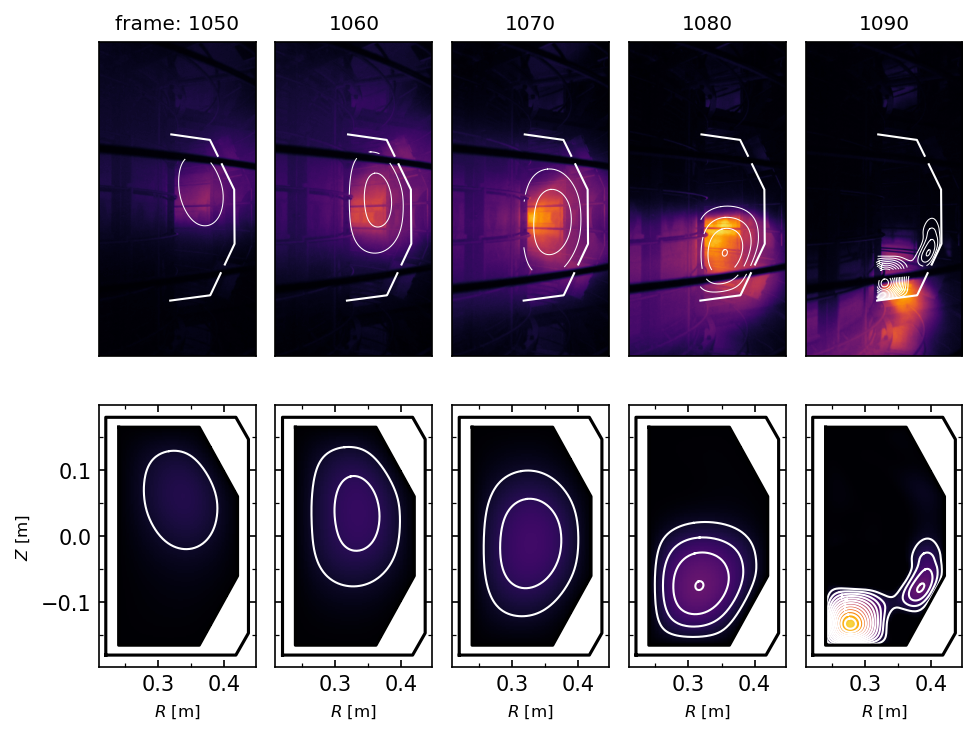
Let us do the tomographic reconstruction for all camera video frames and display them.
[13]:
plt.rcParams["font.size"] = 8
FRAME_FILES = sorted([path for path in (EXP_DATA / "Halpha").glob("*.npy")])
# maximum value of camera images and reconstructed ones
vmax_camera = 0.0
vmax_reconst = 0.0
# cache camera images and solutions
camera_images = []
sols = []
for frame_file in FRAME_FILES:
# load camera image
camera_image = open_memmap(frame_file)
vmax_camera = vmax if (vmax := np.amax(camera_image)) > vmax_camera else vmax_camera
camera_images += [camera_image]
# solve L-curve
lcurve.data = camera_image.ravel()
sol, _ = lcurve.solve(bounds=bounds)
vmax_reconst = vmax if (vmax := np.amax(sol)) > vmax_reconst else vmax_reconst
sols += [sol]
Show some reconstructed images with the camera images.
[14]:
fig, axes = plt.subplots(2, 5, constrained_layout=True)
axes[1, 0].set_ylabel("$Z$ [m]")
# selected frames
FRAMES = [1050, 1060, 1070, 1080, 1090]
for i, frame in enumerate(FRAMES):
# extract index of the frame
index = FRAME_FILES.index(EXP_DATA / "Halpha" / f"{frame}.npy")
# extract camera image and solution
camera_image = camera_images[index]
sol = sols[index]
# construct reconstructed image
reconst_image = profile_1D_to_2D(sol, rtc=rtc)
# show camera image
axes[0, i].imshow(
np.fliplr(camera_image.T), vmax=vmax_camera, cmap="inferno", extent=(1, 256, 512, 1)
)
axes[0, i].xaxis.set_visible(False)
axes[0, i].yaxis.set_visible(False)
# show reconstructed image
contours = show_phix_profile(
axes[1, i],
reconst_image,
rtc=rtc,
vmin=0,
vmax=vmax_reconst,
levels=np.linspace(0, vmax_reconst, 15),
)
axes[1, i].set_xlabel("$R$ [m]")
if i > 0:
axes[1, i].yaxis.set_ticklabels([])
axes[0, i].set_title(f"{frame}")
else:
axes[0, i].set_title(f"frame: {frame}")
# project contours onto camera images
contours = project_lines(contours, phi)
for cont in contours:
cont = fliplr(cont)
axes[0, i].plot(cont[:, 0], cont[:, 1], color="w", linewidth=0.5)
# plot projected limiter
limiter_pts = fliplr(project_limiter_points(phi))
axes[0, i].plot(limiter_pts[:, 0], limiter_pts[:, 1], color="w", linewidth=1.0)
Create tomography GIF animation from all camera frames#
Let us create GIF animation of camera images with reconstructed contours projected on.
[15]:
from IPython import display
from matplotlib.animation import FuncAnimation
from cherab.phix.tools.utils import calc_contours
# Initialize figure and axes object and set its properties
fig, ax = plt.subplots(constrained_layout=True, figsize=(2.5, 5.0))
ax.xaxis.set_visible(False)
ax.yaxis.set_visible(False)
# create lines initially without data
lines = [ax.plot([], [], color="w", linewidth=0.5)[0] for _ in range(100)]
# select initial frame
frame_file = FRAME_FILES[0]
# show first camera image
image = ax.imshow(
np.fliplr(camera_images[0].T), vmax=vmax_camera, cmap="inferno", extent=(1, 256, 512, 1)
)
# convert 2D from 1D solution
reconst_image = profile_1D_to_2D(sols[0], rtc=rtc)
# calculate contours of reconstructed image
levels = np.linspace(0.0, vmax_reconst, 15)
contours = []
for level in levels[1:]:
contours += calc_contours(reconst_image, level, rtc=rtc)
# project contours onto camera images
contours = project_lines(contours, phi)
# plot contours
j = 0
for cont, line in zip(contours, lines):
cont = fliplr(cont)
line.set_data(cont.T)
j += 1
# remove the reset of line data
for line in lines[j:]:
line.set_data([], [])
# plot projected limiter
limiter_pts = fliplr(project_limiter_points(phi))
ax.plot(limiter_pts[:, 0], limiter_pts[:, 1], color="w", linewidth=1.0)
# set title
ax.set_title(f"frame: {frame_file.stem}")
def update(i, lines):
# select one frame
frame_file = FRAME_FILES[i]
# update camera image data
image.set_data(np.fliplr(camera_images[i].T))
# convert 2D from 1D solution
reconst_image = profile_1D_to_2D(sols[i], rtc=rtc)
# calculate contours of reconstructed image
contours = []
for level in levels[1:]:
contours += calc_contours(reconst_image, level, rtc=rtc)
# project contours onto camera images
contours = project_lines(contours, phi)
# update contours
j = 0
for cont, line in zip(contours, lines):
cont = fliplr(cont)
line.set_data(cont.T)
j += 1
# remove the rest of line data
for line in lines[j:]:
line.set_data([], [])
# update title
ax.set_title(f"frame: {frame_file.stem}")
return lines
animation = FuncAnimation(
fig,
update,
fargs=(lines,),
interval=300,
blit=False,
frames=len(FRAME_FILES),
repeat_delay=300,
)
html = display.HTML(animation.to_jshtml())
display.display(html)
plt.close()