Note
This page was generated from docs/notebooks/others/laplacian_operator.ipynb.
Laplacian Operator#
Here, we show you what the laplacian operator and how it works on the example images
Filtering in an image means to perform some kind of processing on a pixel value \(I(x, y)\) using its neighboring pixel values as follows:
where, \(I'(x, y)\): performed pixel value, \(K\): kernel matrix.
Laplacian Operator is a derivative operator which is used to find edges in an image and represented as following kernels:
where, \(K_4\): a kernel that considers the contribution of 4 nearest neighbors (top, bottom, left, right) to the pixel of interest, \(K_8\): a kernel that considers 8 nearest neighbors (top, bottom, left, right, diagonal) to the pixel of interest.
To perform this operator to a image converted 1-D vector array, we generate the laplacian operator matrix.
[1]:
import numpy as np
from matplotlib import pyplot as plt
from matplotlib.cbook import get_sample_data
from matplotlib.colors import CenteredNorm
from PIL import Image

from cherab.phix.tools import laplacian_matrix
Visualize simple laplacian matrix#
Try to create the simple laplacian matrix (50, 50). Firstly, create the mapping array denoting 2-D image shape and the element of which denotes a index.
Plot laplacian matrix as a sparse matrix and compare \(K_4\) and \(K_8\) laplacian kernel
[3]:
neighbors = 4  # Kernel 4
laplacian_mat = laplacian_matrix(mapping_array, dir=neighbors)
/tmp/ipykernel_4668/2369364503.py:2: DeprecationWarning: Conversion of an array with ndim > 0 to a scalar is deprecated, and will error in future. Ensure you extract a single element from your array before performing this operation. (Deprecated NumPy 1.25.)
  laplacian_mat = laplacian_matrix(mapping_array, dir=neighbors)
[4]:
fig, axes = plt.subplots(1, 2, dpi=150, tight_layout=True)
for ax, neighbors in zip(axes, [4, 8]):

    # calculate laplacian matrix
    laplacian_mat = laplacian_matrix(mapping_array, dir=neighbors)

    # plot sparse matrix
    ax.spy(laplacian_mat, markersize=2)
    ax.set_title(f"laplacian matrix K$_{neighbors}$", pad=25)
/tmp/ipykernel_4668/2616474091.py:5: DeprecationWarning: Conversion of an array with ndim > 0 to a scalar is deprecated, and will error in future. Ensure you extract a single element from your array before performing this operation. (Deprecated NumPy 1.25.)
  laplacian_mat = laplacian_matrix(mapping_array, dir=neighbors)
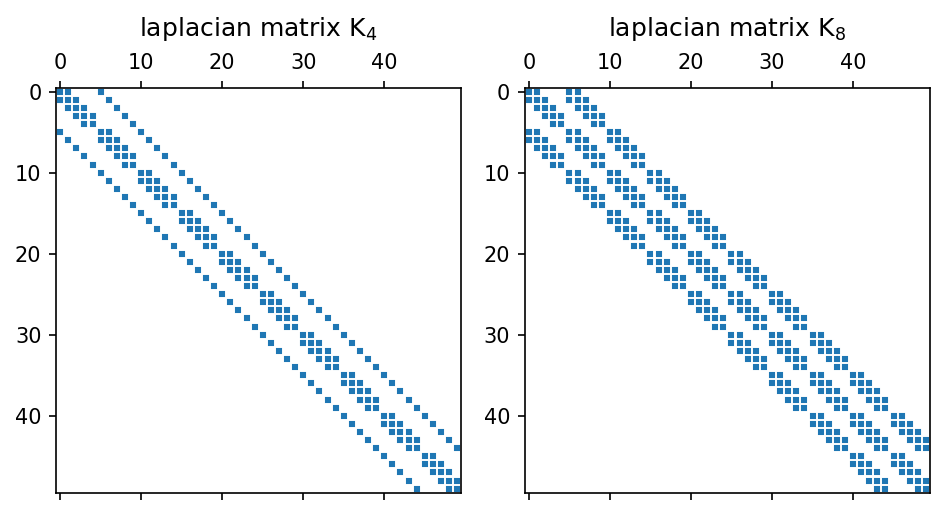
show laplacian matrix \(K_8\) in (10, 10) size as a numpy array.
[5]:
laplacian_mat[0:10, 0:10]
[5]:
array([[-8,  1,  0,  0,  0,  1,  1,  0,  0,  0],
       [ 1, -8,  1,  0,  0,  1,  1,  1,  0,  0],
       [ 0,  1, -8,  1,  0,  0,  1,  1,  1,  0],
       [ 0,  0,  1, -8,  1,  0,  0,  1,  1,  1],
       [ 0,  0,  0,  1, -8,  0,  0,  0,  1,  1],
       [ 1,  1,  0,  0,  0, -8,  1,  0,  0,  0],
       [ 1,  1,  1,  0,  0,  1, -8,  1,  0,  0],
       [ 0,  1,  1,  1,  0,  0,  1, -8,  1,  0],
       [ 0,  0,  1,  1,  1,  0,  0,  1, -8,  1],
       [ 0,  0,  0,  1,  1,  0,  0,  0,  1, -8]], dtype=int32)
Apply the laplacian matrix to a sample image#
Next, let us to apply a laplacian matrix to pixels of a sample image.
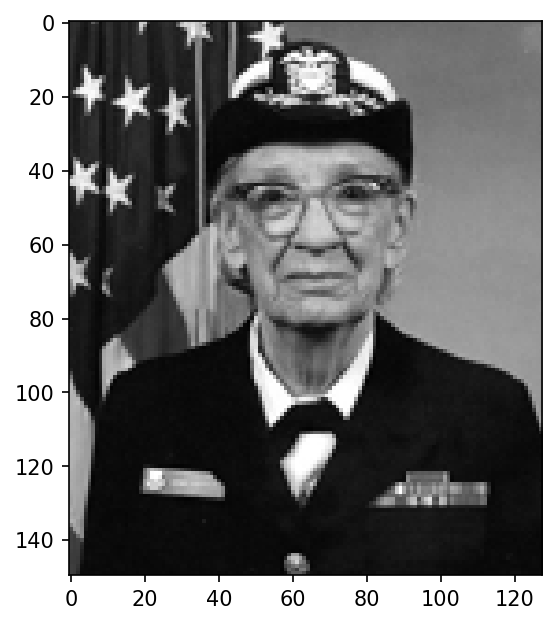
Load sample image data from the matplotlib library.
[6]:
with get_sample_data("grace_hopper.jpg") as file:
    arr_image = plt.imread(file)

# resize the image deu to the large size.
with Image.fromarray(arr_image, mode="RGB") as im:
    (width, height) = (im.width // 4, im.height // 4)
    arr_image = np.array(im.resize((width, height)))

# convert RGB image to monotonic one
arr_image = arr_image.mean(axis=2)

# show image
print(f"image array shape: {arr_image.shape}")
fig, ax = plt.subplots(dpi=150)
ax.imshow(arr_image, cmap="gray");
image array shape: (150, 128)
[7]:
# create mapping array
image_map = np.arange(0, arr_image.size, dtype=np.int32).reshape(arr_image.shape)

# create laplacian matrix with K8
neighbors = 8
laplacian_mat = laplacian_matrix(image_map, dir=neighbors)
/tmp/ipykernel_4668/4190732178.py:6: DeprecationWarning: Conversion of an array with ndim > 0 to a scalar is deprecated, and will error in future. Ensure you extract a single element from your array before performing this operation. (Deprecated NumPy 1.25.)
  laplacian_mat = laplacian_matrix(image_map, dir=neighbors)
calculate laplacian filtered image is calculated by multiplying the image vector by the laplacian matrix.
[8]:
filterd_image = np.reshape(laplacian_mat @ arr_image.ravel(), arr_image.shape)
[9]:
# show image
fig, ax = plt.subplots(dpi=150)
mappable = ax.imshow(filterd_image, cmap="seismic", norm=CenteredNorm())
cbar = plt.colorbar(mappable)
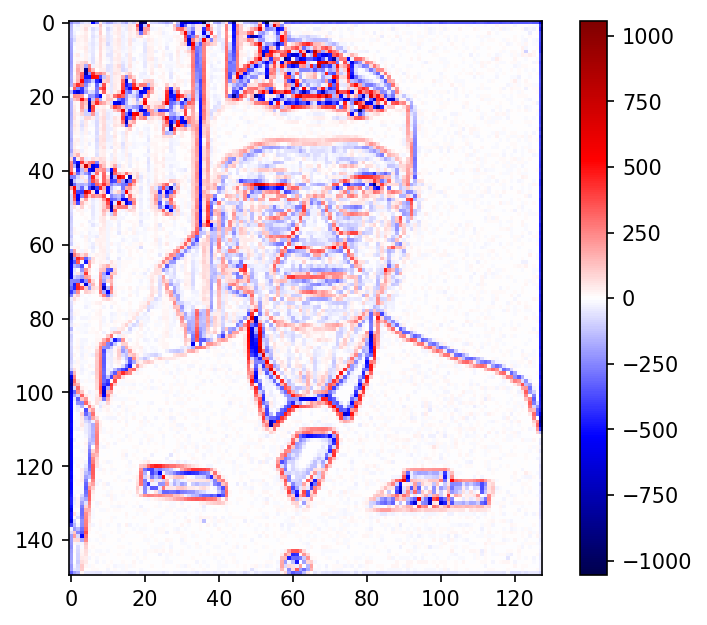
Here, the edge of the image is emphasized clearly. In the tomography techneque, we make use of this operator to smooth reconstructed images.